

Description
Download Wrike – Project Management, Google Integration, Collaboration Tool
Overview
Wrike is an award-winning project management and collaboration platform designed for high-performing teams aiming to streamline workflows, enhance productivity, and achieve consistent results. The software enables users to organize tasks, manage projects from inception to completion, and improve team coordination across distributed work environments. It is particularly suited for professionals in fast-paced industries such as marketing, IT, product development, and operations who require structured yet flexible tools to track progress and meet deadlines.
Wrike’s core purpose lies in simplifying complex project structures by offering visual planning tools, real-time collaboration features, and seamless integration with widely used productivity ecosystems. The platform supports end-to-end project lifecycle management, from initial task assignment to final delivery, helping teams reduce miscommunication and increase transparency. Its recognition by Gartner as a 2014 “Cool Vendor” in Social Software and Collaboration underscores its innovation and market relevance.
Real-world usage scenarios include managing cross-functional campaigns, coordinating software releases, and tracking client deliverables. Teams leverage Wrike to centralize project information, assign responsibilities, and monitor timelines—all within a unified workspace. The developer did not provide additional details about organizational scale or specific team sizes beyond general applicability.
Key Features & Capabilities
- Interactive Gantt Charts – Visualize project timelines, dependencies, and milestones with drag-and-drop scheduling. Ideal for planning long-term initiatives with multiple phases.
- Customizable Dashboards – Create personalized views to monitor KPIs, task statuses, and team performance in real time. Tailor layouts to match departmental or project-specific needs.
- Spreadsheet View – Use familiar spreadsheet formatting for task lists, timelines, and resource allocation. Supports filtering, sorting, and formula-like functionality for enhanced data control.
- Real-Time Collaboration – Multiple team members can edit documents, comment on tasks, and update statuses simultaneously without version conflicts.
- Document Versioning & Revision History – Track changes to files and restore previous versions, ensuring data integrity and accountability.
- Google Integration Suite – Connect directly with Google Drive, Gmail, Google Calendar, and Google Workspace for unified access and workflow continuity.
- Time Tracking & Workload Management – Monitor hours spent on tasks and balance team workloads to prevent burnout and ensure equitable distribution.
- Custom Workflows & Advanced Analytics – Build automated approval processes and generate detailed reports to support strategic decision-making.
These capabilities empower teams to transition from fragmented tools to a centralized command center. For example, a marketing team can import campaign tasks into Google Calendar, assign them via Wrike, track time spent, and review performance dashboards—all while maintaining document history in Google Drive.
User Interface, Workflow & Performance
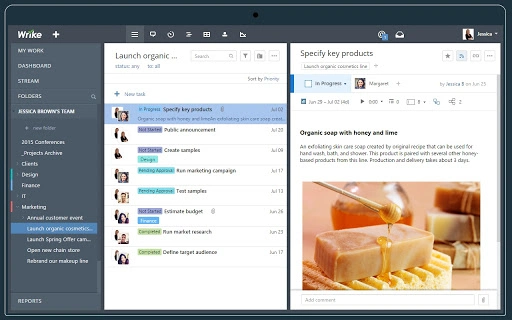
The user interface of Wrike is structured around intuitive navigation, with a clean layout that separates core functions into clearly labeled sections: project views, task lists, calendars, and activity feeds. Users can switch between different views—Gantt, List, Board, and Calendar—based on their workflow preferences, promoting flexibility without compromising clarity.
Navigation is streamlined through a sidebar menu and contextual toolbars, allowing quick access to project settings, team members, and reporting tools. The workflow emphasizes efficiency by enabling drag-and-drop task assignments, status updates, and file uploads directly within task cards. This reduces context switching and enhances focus during execution.
Performance observations are based on general software behavior patterns. The developer did not specify resource usage details. Stability during extended use has not been publicly documented. However, the platform’s reliance on cloud infrastructure suggests consistent uptime and responsive interactions under normal conditions. CPU and RAM behavior are not publicly disclosed.
Compatibility & System Requirements
Wrike is compatible with both Windows and Mac operating systems, making it accessible to a broad range of users across different device ecosystems. The software has a download size of 150 MB, which is typical for desktop applications with integrated cloud functionality.
Exact system requirements were not listed. Compatibility information was partially provided. Users are expected to run the application on modern machines with standard internet connectivity, as the software relies heavily on cloud synchronization and real-time updates. The developer did not provide additional system requirements.
Pros and Cons
Pros
- Seamless integration with Google Workspace and key services like Drive, Calendar, and Gmail
- Powerful visual planning tools including Gantt charts and customizable dashboards
- Real-time collaboration features enhance team alignment and reduce delays
- Supports multiple project views for diverse workflow preferences
- Free version offers robust functionality suitable for small to mid-sized teams
Cons
- Advanced features may be limited in the free tier
- Performance under heavy workloads depends on internet stability
- Resource usage details were not disclosed
- Some users may require training to fully utilize customization options
FAQ Section
Is Wrike compatible with Windows and Mac?
Yes, Wrike supports both Windows and Mac operating systems, allowing users to install and run the desktop application on either platform.
Can I use Wrike offline?
Wrike is primarily a cloud-based tool. While some data may be cached locally, full functionality requires an active internet connection.
Is Wrike safe to download and use?
Wrike is a secure platform used by organizations worldwide. It supports Single Sign-On and enterprise-grade data protection. Users should always download from the official website to ensure authenticity.
How often does Wrike release updates?
Wrike regularly releases updates to improve performance, add features, and address security concerns. The frequency is not publicly specified but is consistent with industry standards for cloud-based software.
What license type does Wrike use?
Wrike offers a free tier with limited access to premium features. Additional functionality is available through paid plans, which are subscription-based.
Final Thoughts + CTA
Wrike stands out as a comprehensive project management and collaboration solution, particularly for teams already embedded in the Google ecosystem. Its deep integration with Google Drive, Calendar, and Workspace makes it a natural fit for organizations prioritizing seamless workflow continuity. The combination of visual planning tools, real-time collaboration, and customizable workflows enables teams to manage complex projects with clarity and confidence.
While advanced features are reserved for paid tiers, the free version delivers substantial value for small to mid-sized teams. The absence of detailed system requirements or performance metrics is a minor limitation, but the platform’s cloud-first design mitigates most local hardware concerns.
For professionals seeking a secure, scalable, and intuitive desktop application to organize tasks, manage projects, and boost team productivity, Wrike is a compelling choice. Download Wrike now and experience the power of intelligent project management.
Guides & Tutorials for Wrike - Project Management App for Chrome
How to install Wrike - Project Management App for Chrome
- Click the Preview / Download button above.
- Once redirected, accept the terms and click Install.
- Wait for the Wrike - Project Management App for Chrome download to finish on your device.
How to use Wrike - Project Management App for Chrome
This software is primarily used for its core features described above. Open the app after installation to explore its capabilities.
User Reviews for Wrike - Project Management App for Chrome 0
No reviews found





